1. 사전작업
Local Git Repository가 생성되어 있는 것을 가정한다.
관련 내용은 Git Local Repository (로컬 저장소) 생성을 참고한다.
2. Github Repository 생성
이 부분은 각자 알아서 한다.
3. Repository 연결
$ git remote add origin https://github.com/xxxxx/restest-server.git
$ git remote -v
origin	https://github.com/xxxxx/restest-server.git (fetch)
origin	https://github.com/xxxxx/restest-server.git (push)
4. git push
이제 remote로 git push한다.
$ git push origin master
Username for 'https://github.com': xxxxx
Password for 'https://xxxxx@github.com':
To https://github.com/xxxxx/restest-server.git
 ! [rejected]        master -> master (fetch first)
error: failed to push some refs to 'https://github.com/xxxxx/restest-server.git'
hint: Updates were rejected because the remote contains work that you do
hint: not have locally. This is usually caused by another repository pushing
hint: to the same ref. You may want to first integrate the remote changes
hint: (e.g., 'git pull ...') before pushing again.
hint: See the 'Note about fast-forwards' in 'git push --help' for details.
이 에러가 나는 이유는 각자 찾아보고, 우선 다음과 같이 git pull을 수행한다.
$ git pull origin master --allow-unrelated-histories
warning: no common commits
remote: Enumerating objects: 6, done.
remote: Counting objects: 100% (6/6), done.
remote: Compressing objects: 100% (2/2), done.
remote: Total 6 (delta 0), reused 0 (delta 0), pack-reused 0
Unpacking objects: 100% (6/6), done.
From https://github.com/xxxxx/restest-server
 * branch            master     -> FETCH_HEAD
 * [new branch]      master     -> origin/master
Merge made by the 'recursive' strategy.
 README.md | 1 +
 1 file changed, 1 insertion(+)
 create mode 100644 README.md
이제 다시 git push한다.
git push origin master
Enumerating objects: 31, done.
Counting objects: 100% (31/31), done.
Delta compression using up to 4 threads
Compressing objects: 100% (19/19), done.
Writing objects: 100% (30/30), 50.34 KiB | 12.59 MiB/s, done.
Total 30 (delta 1), reused 0 (delta 0)
remote: Resolving deltas: 100% (1/1), done.
To https://github.com/xxxxx/restest-server.git
   fc3d061..7040689  master -> master
그러면 Github Repository 상에 commit된 것을 볼 수 있다.
5. Jenkins 설정
5.1. [새로운 Item] 생성
-
GitHub project 체크, Project url에는 Github project 주소 (.git 붙이지 않음) 입력
예: https://github.com/xxxxx/restest-server -
소스 코드 관리는 Git 체크, Repositories의 URL은 Github project 주소를 넣되 .git 추가함
예: https://github.com/xxxxx/restest-server.git -
소스 코드 관리의 Repositories에서 Credential 생성
1) ID/PW 방식
2) SSH Key 방식 (5.2.로 따로 분류하여 설명)
5.2. SSH Key 방식 설정
$ ssh-keygen -t rsa -f key-jenkins
Generating public/private rsa key pair.
Enter passphrase (empty for no passphrase):
Enter same passphrase again:
Your identification has been saved in key-jenkins.
Your public key has been saved in key-jenkins.pub.
The key fingerprint is:
(생략)
위와 같이 ssh-keygen -t rsa -f [key 파일 이름] 입력하고 passphrase는 그냥 엔터로 넘어간다.
그러면 파일이 2개 생성되는데 예를 들어 위에처럼 key 파일 이름을 key-jenkins로 줬다면 key-jenkins, key-jenkins.pub 2개 파일이 생성되는 것이다.
- key-jenkins : 로컬에서 사용할 개인키
- key-jenkins.pub : Github에 올릴 공개키
5.1에서 소스 코드 관리 하위의 Credentials에 [Add]를 누른다. 거기서 [Username with password] 방식이 아닌 [SSH username with private key]를 선택한 후 username과 위에서 생성된 개인키(key-jenkins 내용)를 입력한다.
그리고 Github의 해당 Repository 내 Settings로 들어간 후 좌측 메뉴 중 [Deploy keys] 선택 후 [Add deploy key]를 하고 공개키(key-jenkins.pub 내용)를 입력한다.
6. Local - Remote 연결 확인
이렇게 Local - Remote 연결이 잘 되어있는 상태틀 확인하고자 한다면 Jenkins의 해당 프로젝트에서 [Build Now]를 통해 빌드 테스트를 해보면 된다. 하지만 실제 무슨 빌드가 벌어지는 것은 아니라고 할 수 있다.
7. 빌드 설정
Jenkins에서 해당 프로젝트 [구성] 메뉴(좌측 메뉴 중에 있음)로 들어간다.
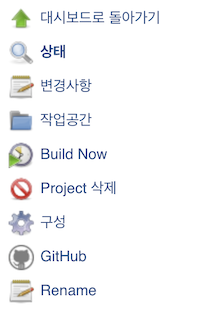
위와 같은 메뉴에서 [구성]을 말하는 것이다. [구성]에 들어가서 아래쪽의 [Build]를 확인한다.
[Add build step] 후, 그리고 "Invoke top-level Maven targets" 선택 후 아래와 같이 빌드 설정을 추가한다.
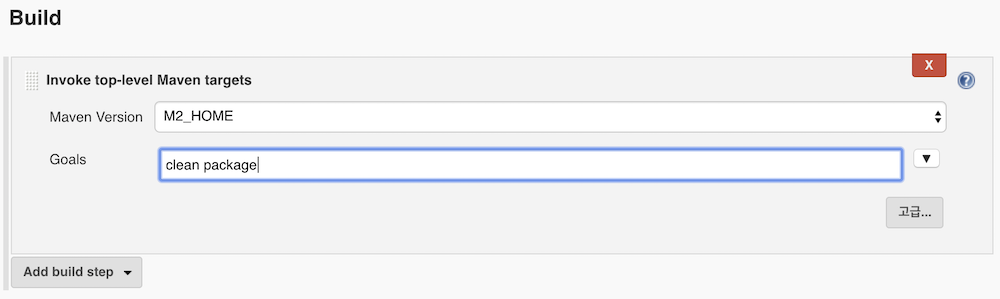
그리고 다시 [Build Now]하면 빌드가 진행되며 완료 후 Console Output을 통해 정상적으로 종료되었음을 알 수 있다.
[INFO] ------------------------------------------------------------------------
[INFO] BUILD SUCCESS
[INFO] ------------------------------------------------------------------------
[INFO] Total time:  6.679 s
[INFO] Finished at: 2019-09-07T23:51:37+09:00
[INFO] ------------------------------------------------------------------------
Finished: SUCCESS
그리고 ~/.jenkins/workspace/restest-server/target에 MyRestServer-0.0.1-SNAPSHOT.jar 파일이 생성되었다.